
Pools+
Missing Link Dev
Pools+
Support Development
If you enjoy Pools+ and my other extensions, please consider supporting development on Patreon! Your support helps me continue creating and maintaining quality extensions for the Owlbear Rodeo community.
A full-featured resource pool tracker built for Owlbear Rodeo. Track any TTRPG resource — Bardic Inspiration dice, Ki Points, Superiority Dice, Fate Points, Bennies, and more — without ever leaving your game.
Features
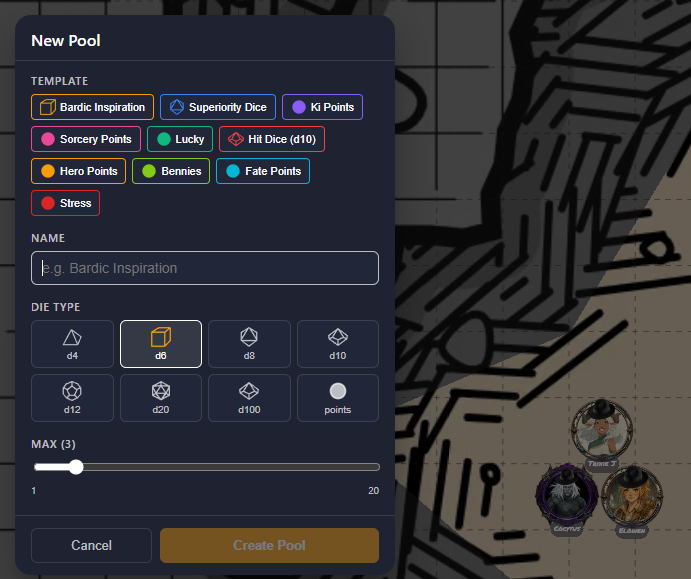
- Dice Pools — d4, d6, d8, d10, d12, d20, and d100 pools with visual die icons that match your pool colour. Click to spend, click again to restore.
- Point Pools — Numeric dot display for resources you count without rolling (Ki Points, Sorcery Points, Spell Slots, etc.)
- 10 Built-In Templates — Pre-configured pools for the most common D&D 5e and generic TTRPG resources. One click to set up Bardic Inspiration, Superiority Dice, Bennies, Lucky, and more.
- Give a Die — Hand individual dice directly to other players. Recipients get a floating card they can roll or dismiss — perfect for Bardic Inspiration and Bless.
- Shared Pools — Room-level resources visible and usable by everyone. Great for group counters any player can spend from or restore.
- Dice+ Integration — Optional 3D physics dice animation when Dice+ is installed. Local fallback roller always available.
- Roll Visibility — Per-player setting to control who sees your roll results: Self only, GM only, or Everyone.
- GM View — Full party overview showing all players' pools. GMs can create, edit, and delete pools for any player, and trigger rest resets (short, long, or session) for everyone at once.
- OBR Theme — Adapts automatically to Owlbear Rodeo's light and dark themes.
Table of Contents
Dice Pools
Create a pool for any die type (d4 through d100). Each slot shows a coloured die icon — spend it with a click, restore it with another. Enable Roll When Spent to automatically trigger a Dice+ roll every time you spend a die.
Great for: Bardic Inspiration, Superiority Dice, Hit Dice, Wild Magic surges, and any other resource represented by a physical die.
Point Pools
Point pools use simple dots instead of die faces — ideal for resources you count without rolling. Set a minimum value above 0 to support systems that allow spending into debt.
Great for: Ki Points, Sorcery Points, Rage (Barbarian), Psi Points, Spell Slots, and any numeric resource.
Give a Die
Hover over any active die slot and click the round arrow button to give that die to another player. The die is deducted from your pool and appears as a floating card on the recipient's screen. They can roll it (triggering Dice+ if available) or dismiss it — useful for Bardic Inspiration, Bless, Shield of Faith, and similar hand-off mechanics.
Shared Pools
Shared pools live at the room level and are visible to all players. Any player can spend or restore a shared pool — great for group resources like a shared Luck pool, round counters, or any party-wide tracker.
GM Features
Click the 🛡️ GM View button to open the party overview panel:
- See all players' pools (including private ones) at a glance
- Create pools and assign them to specific players
- Edit any player's pool — name, die type, max, colour, settings
- Trigger Short Rest, Long Rest, or Session Start resets for all matching pools at once
- Automatic GM backup ensures players' pools are restored if they disconnect or refresh